FOP and BOP food packaging nutritional info and ingredients. Done in seconds.
CopySync reads your copy doc and fills your Illustrator artwork: nutrition tables, Reference Intake percentages, food traffic light nutrition colours, back-of-pack values and allergen bold. Load a PDF, Word, Excel or CSV file, or connect an online sheet. Customisable for different regions and retailer rules, and used by packaging Artworkers.
For freelancers and studio teams. Thresholds and label formats can be tuned for other markets.
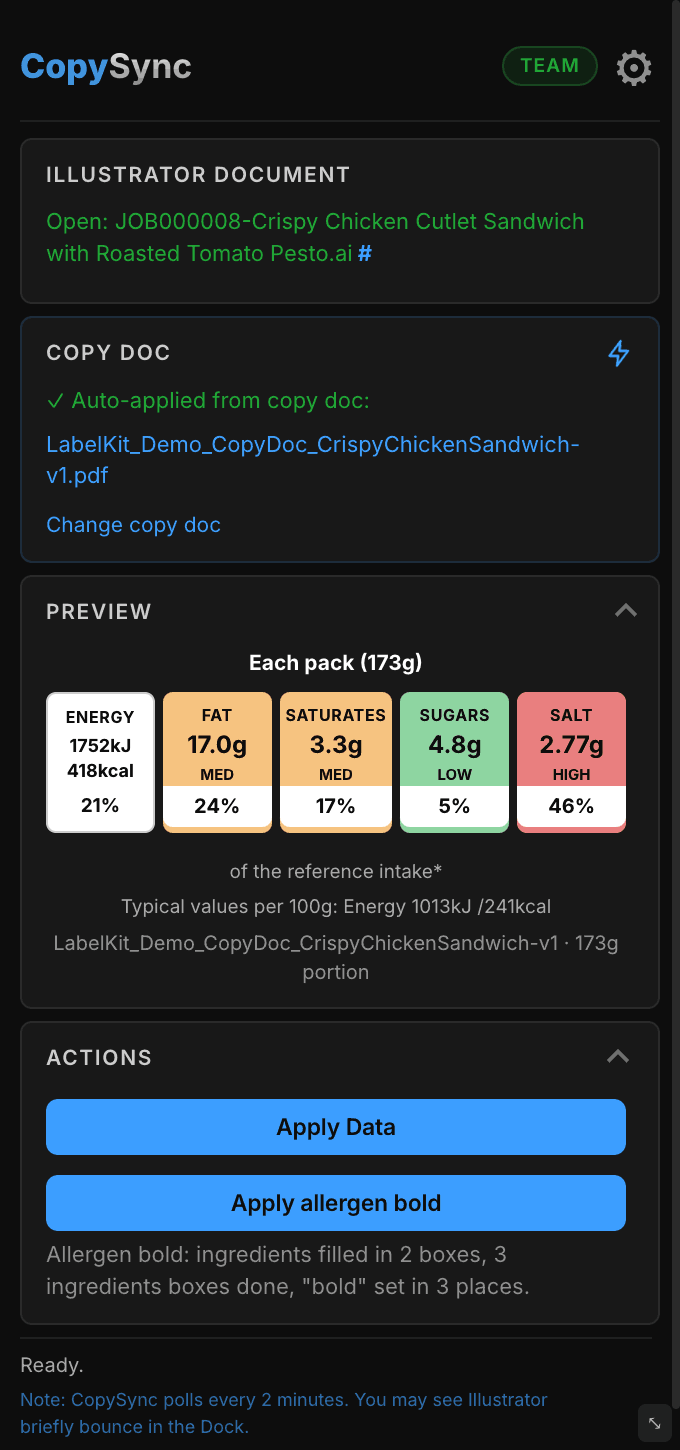
How to add traffic light labels in Illustrator
Five steps from SKU copy doc to print-ready packaging artwork.
Load your data
Drop in an Excel or CSV file, load a Word copy pack, paste a Google Docs or Sheets link, or import a PDF copy-brief with your full product nutritional table.
Auto-calculate
CopySync checks the correct nutrition thresholds for your market and assigns the right traffic light colour for every nutrient.
Apply or batch export
Update one artwork in a click, or batch export labelled .ai, PDF and PNG for every product at once.
Fill the back-of-pack table
Every cell comes from the copy doc: per 100g and per portion columns, the %RI column, the serving size heading and the number of servings in the pack.
Carry the bold across
On the Team plan, allergens set bold in the copy doc become bold in the artwork, using the real Bold font of the same family.
See it in action
One click turns a copy document into finished traffic lights, nutrition tables and ingredients with allergens in bold
What you're watching
- 0:00The sandwich carton artwork is open in Illustrator with the minimised CopySync panel beside it
- 0:03Back of pack: the ingredients and allergy advice boxes contain placeholders
- 0:07Front of pack: the traffic light boxes are waiting for values (and blue)
- 0:10Back of pack: the nutrition table is set up with placeholders
- 0:14The CopySync panel has already found the copy document, and Apply Data is ready
- 0:15One click on Apply Data (but can run automatically)*
- 0:16The data from the copy doc fills in: ingredients, with allergens in bold, then the traffic lights and %RI, then the full nutrition table
- 0:23The panel confirms the data was applied and the number of bold allergen ingredients
- 0:25The report shows what was filled in and flags anything to check
* When using Silent mode the process is rarely interrupted, or delayed, and rapid.
Traffic light and Reference Intake (RI), handled for you.
Front-of-Pack labelling uses three colour bands per nutrient – typically Fat, Saturates, Sugars and Salt – alongside Reference Intake (RI) percentages, to communicate nutritional content at a glance.
CopySync ships with the FSA thresholds it was built and tested against, and can be configured for other markets, with the traffic light colours, RI percentages and label values mapped to your artwork.
Reference Intake (RI) is the current FSA/GOV.UK term (formerly known as GDA).
Low – a healthier choice for that nutrient
Medium – neither high nor low
High – eat less often / in smaller amounts
Everything a packaging artworker needs
Server-validated licensing
Secure activation tied to your machine. Studio and Team plans support multiple seats.
Auto folder detection
Studio and Team plans detect your copy pack automatically from the job folder structure on your file server. Works with Word docs, Google Docs, and Google Sheets.
Illustrator panel
Native CEP panel for macOS, Illustrator 2024 (v28) and above. Windows coming soon.
Google Docs & Sheets
Studio and Team plans can load NI data directly from a Google Docs or Google Sheets share link – no download needed.
PDF copy-brief import
Reads nutrition data directly from client copy-brief PDFs, including the ingredients and allergen bold. Standard layouts are handled automatically, with an AI-assisted fallback for less common formats.
Compact panel mode
The panel can shrink to a small strip showing just the copy doc name and the Apply buttons, so it stays out of the way while you work.
Minimise it and let it run
Set and forget
Open a file. Data applies itself. Team plan.
Stays in sync
Changes can be re-applied automatically. CopySync checks the artwork as well as the copy doc, so a file that has been reverted or reopened with its old text is never shown as in sync.
Multi-document safe
Each artwork gets its own data, never another job's.
Your choice of copy doc
Several per job? Switch or browse in one click.
Tuned to your market
Adapted to local packaging and copy doc requirements.
Out of your way
Minimise the panel when you need to.
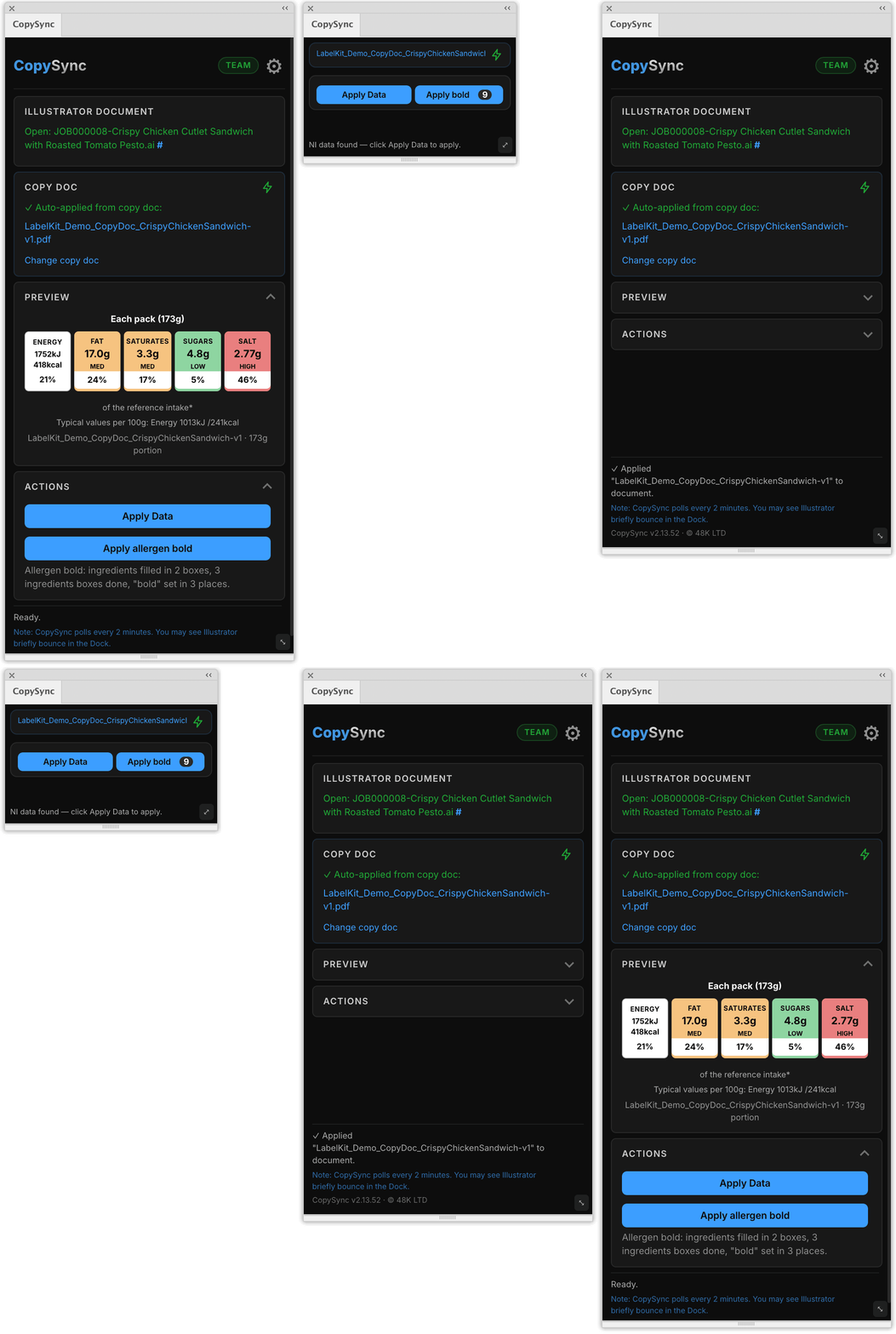
PDF copy-brief import
CopySync reads standard nutrition tables directly from a PDF copy-brief – no special tag or manual markup required. It sits alongside the existing .docx, CSV, XLSX, and Google Docs/Sheets data sources, so you can use whichever format the client actually sends.
- No special markup required. Unlike Word copy docs, which need a marker above the table, PDFs need nothing added.
- Two-layer extraction. A deterministic parser handles the vast majority of documents instantly. An AI-assisted fallback fills in genuine gaps only when needed, and never invents or estimates a value – every AI-filled value must literally appear in the source document text, or it's rejected.
- Flagged for review. Any field that remains genuinely uncertain after both steps is clearly flagged for manual review before it reaches the artwork – never silently guessed.
- Missing values are impossible to miss. If a value is not in the copy doc, CopySync prints a long marker (!---!---!) in the artwork and colours it with a spot swatch, so preflight and separations catch it. When you fix the copy and apply again, the original colour comes back.
- Not a replacement. PDF is an additional option alongside .docx, CSV, XLSX, and Google Docs/Sheets – use the format that matches each job.
Back-of-pack nutrition table, filled for you
CopySync already fills the front-of-pack traffic light label. It now also fills the full back-of-pack nutrition table in the artwork, from PDF copy docs.
- Every cell, from the copy doc. Energy (kJ and kcal), Fat, Saturates, Carbohydrate, Sugars, Fibre, Protein and Salt, in both the per 100g and per portion columns.
- The whole table. The %RI column, the serving size heading and the number of servings in the pack are filled too.
- Whole columns at once. Fill a whole nutrition column in one go instead of cell by cell. Energy lines that would run too wide break cleanly after the slash, never in the middle of a number, and the rows stay level.
- One-line nutrition. Some packs print nutrition as a sentence, not a table. CopySync writes the whole per 100g and per portion lines for you, in the legal order and in the copy doc's own wording, and keeps your bold heading.
- Your formatting stays put. Values go in without disturbing the bold, sizes and styling you have already set in the frame.
- Exactly as stated. Values print exactly as the copy doc states them, including declarations such as "<0.1g". Missing values are clearly marked, so nothing is silently wrong.
- Declared quantity and the ℮ mark. CopySync fills the declared quantity and the ℮, enlarging the ℮ to at least 3mm and scaling the quantity to match so they stay in proportion. You stay responsible for checking the minimum height for your pack size.
- Job number from the file name. CopySync fills the job number from the name of the open file, up to the first space or hyphen.
- Ready-made template. A ready-made template file is included, so you can start straight away.
The back-of-pack table works with PDF copy docs now. Word support is coming.
Quantity and ℮ are read from PDF copy docs.
Allergen bold, carried from the copy doc
On the Team plan, if the ingredients list is bold in the copy doc, CopySync makes the same words bold in the artwork. It works with Word and PDF copy docs.
- Multi-pack aware. It handles meal boxes and multi-pack products with several ingredients lists, and updates every matching box in the artwork.
- The details too. It also bolds the word "bold" in "see ingredients in bold", and uses the real Bold font of the same family, never fake bold.
- Automatic or on demand. It runs automatically after Apply Data, or on demand with an "Apply bold" button, and shows how many words were made bold. Locked layers are unlocked and locked again automatically, like the nutrition data.
- Your brand's allergen weight. If a range highlights allergens with a different weight, such as Black, instead of Bold, set a rule for that brand: when its spot colour is used in the artwork, allergens use that weight. Without a rule, allergens use the font's true Bold.
CopySync does not decide what is an allergen. It reproduces the bold that is already in the copy doc, and the brand stays responsible for checking allergen declarations.
CopySync pays for itself.
Manual nutrition labelling takes around 10 minutes per SKU – re-keying values, recolouring artwork elements, copying ingredients and bolding allergens. At a typical studio day rate, that time adds up fast.
- Manual time
- 8.3 hours
- Cost at £300/day
- £313
- CopySync
- CopySync Solo · £300/year
- Manual time
- 16.7 hours
- Cost at £300/day
- £625
- CopySync
- CopySync Solo · £300/year
- Manual time
- 83 hours
- Cost at £300/day
- £3,125
- CopySync
- CopySync Team · £2,000/year (10 seats)
CopySync breaks even at about 48 SKUs a year on Solo, 120 on Studio and 320 on Team (10 seats, about 32 per person), based on 10 minutes per SKU and a £300 day rate.
CopySync pricing for professional packaging artwork teams
The Adobe Illustrator extension that automates label production, reduces manual copy errors, and helps packaging teams create accurate artwork faster.
For independent users and individual packaging projects.
- Import existing CSV and Excel copy packs
- Import Microsoft Word copy documents
- Generate production-ready PDF and PNG files in batches
- Automatic food traffic light nutrition colours
- Full back-of-pack nutrition table: per 100g and per portion, %RI and servings
- Secure licence validation
For packaging agencies and small production teams.
- Visual copy comparison with before/after diff view
- Automatically locate the correct copy pack from your job folder
- Import directly from Google Docs and Google Sheets
- Configure workflows around your existing folder structure
For internal artwork departments and larger production workflows.
- Choose automatic or manual copy application
- Automatically update labels when files are opened
- Allergen bold carried over from the copy doc
- Priority support with faster response times
For manufacturers and organisations with complex packaging operations.
- Dedicated onboarding and workflow setup
- Custom licence deployment options
- Enterprise support agreements
- Volume licensing
- Custom integrations and workflow configuration
Choose the plan that matches your production workflow. Whether you are an individual user, packaging agency, or global manufacturer, CopySync scales with your needs.
How perpetual licensing works
Buy once and own CopySync permanently. Your perpetual licence includes the first year of updates and support at no extra cost. From year 2, an optional annual maintenance fee keeps you on the latest version and gives you access to support. If you choose not to renew maintenance, your licence remains valid – you simply keep the version you have.
Pricing is per licence, not per seat count shown. A studio with 10 seats on the Team plan pays £2,000/year in total, not per person. All plans include secure licence validation and traffic light colour automation, proven on UK FSA rules and configurable for other markets.
Manual artwork workflows vs CopySync
- Copy-pasting values SKU by SKU
- Redoing the range on every revision
- Manual before/after eyeballing
- Re-keying the back-of-pack table by hand
- Hand-bolding allergens, one word at a time
- Typos and colour mismatches slip through
- Production waits on artwork
- Data applied to every SKU, automatically
- One click reruns the entire range
- Built-in before/after copy comparison
- Back-of-pack table filled, per 100g and per portion
- Allergen bold carried across from the copy doc (Team)
- Consistent values and FoP colours, every time
- Artwork ready before production asks
System requirements
- macOS 12 Monterey or later
- Adobe Illustrator 2024 (v28) or later
- Active internet connection with outbound HTTPS (port 443) access for licence validation
- Installs as an Illustrator panel: Window › Extensions › CopySync
Traffic light and Reference Intake (RI) labelling: FAQs
Common questions from freelance packaging artworkers, studios and in-house packaging teams.
What is traffic light labelling on food packaging?
+
Traffic light labelling is the UK Front-of-Pack (FoP) system that colour-codes Fat, Saturates, Sugars and Salt as green (low), amber (medium) or red (high) per 100g or 100ml, shown alongside Reference Intake (RI) percentages so shoppers can compare products at a glance.
What does Reference Intake (RI) mean on a nutrition label?
+
Reference Intake (RI) is the current FSA/GOV.UK term for the percentage of an average adult's daily intake supplied by a portion – 8,400kJ/2,000kcal. It replaced the older GDA wording, and CopySync calculates and places RI percentages automatically for every SKU.
What is GDA on a nutrition label?
+
GDA (Guideline Daily Amount) was the older UK term for the percentage of an average adult's daily intake a portion provides. It's been officially replaced by Reference Intake (RI) – the current FSA/GOV.UK term – but "GDA" is still widely used out of habit. CopySync calculates and applies RI percentages automatically; if your copy doc or brief still uses "GDA," it means the same thing.
Can a freelance packaging artworker use CopySync?
+
Yes. The Solo plan is built for freelance packaging artwork – one seat, the full Illustrator panel, and traffic light plus RI automation for every job you take on. Studio and Team plans add multiple seats, auto folder detection and Google Docs and Sheets loading.
How do I add traffic light labels to artwork in Adobe Illustrator?
+
Install the CopySync CEP panel, load your SKU copy doc (CSV, XLSX, DOCX, PDF or a Google Docs/Sheets link), and apply. CopySync reads the nutritional values, works out the correct colour band for each nutrient, and writes values, RI percentages and colours straight into your Illustrator artwork.
Does CopySync work outside the UK?
+
Yes. It was built and battle-tested on UK FSA Front-of-Pack rules, and thresholds, label formats, units and language can be configured for other markets, so food and drink brands worldwide can use the same automated packaging artwork workflow.
Is traffic light labelling a legal requirement?
+
In the UK, Front-of-Pack traffic light labelling is voluntary but strongly recommended by the FSA and expected by most major retailers. The back-of-pack nutrition declaration itself is mandatory. CopySync helps you meet either consistently.
How much time does automated nutrition labelling save per SKU?
+
Manual labelling typically takes 1–3 minutes per SKU once you include re-keying values, checking thresholds and recolouring. CopySync applies a whole range in a single pass, so a launch that took a day of artworking usually lands in minutes.
Can CopySync batch export labelled artwork for a whole range?
+
Yes. You can update one artwork in a click or batch export labelled .ai, PDF and PNG files for every product in the copy pack at once, which is how most studios handle multi-SKU packaging ranges and reprints.
What PDF structure does CopySync support for copy briefs?
+
PDF copy-brief import works with text-based (digitally generated) PDFs where the nutrition panel is a real table or a consistently labelled key/value list – not flattened images or scans. Standard UK nutrition table layouts are handled automatically, with AI-assisted fallback for less common formats.
How does CopySync extract Reference Intake (RI) values?
+
CopySync reads the per-portion energy and nutrient values from your SKU copy doc and calculates each Reference Intake (RI) percentage against the standard adult reference of 8,400kJ/2,000kcal, plus the reference amounts for fat, saturates, sugars and salt. If your copy doc already states RI percentages, it can use those instead so the artwork matches the signed-off brief exactly.
What does server-validated licensing mean for a team?
+
Every activation is checked against our licence server rather than a local key file, so seats are tied to real machines and can be reassigned when someone changes laptop or leaves. Studio, Team and Enterprise plans share a seat pool, so an admin can see what is in use and keep the whole team on the same version without passing licence files around.
Can CopySync be adapted to my local market?
+
Yes. CopySync ships with the UK FSA traffic light thresholds it was built and tested against, and it can be configured for other markets. We map your market's rules to your artwork: the traffic light colours and swatches, Reference Intake values, nutrient thresholds, units and label wording.To set it up, we need a few sample copy docs and a note of the labelling rules or retailer requirements you work to. We then configure and test it with you before you roll it out to your team.If you work across more than one region or retailer, each can have its own settings. Get in touch to discuss your market.
What does support & maintenance cover on a perpetual licence?
+
Bug fixes, new releases and support. The first year is included. After that it is £180/year (Solo), £450/year (Studio) or £1,200/year (Team). It is optional: if you stop, you keep the version you have, with no further bug fixes, new releases or support.